SPIC - Play Integrity Checker
- 4.2
- Rating
- 100.00K
- Installs
- Free
- Price

 Analysis by App-foxy
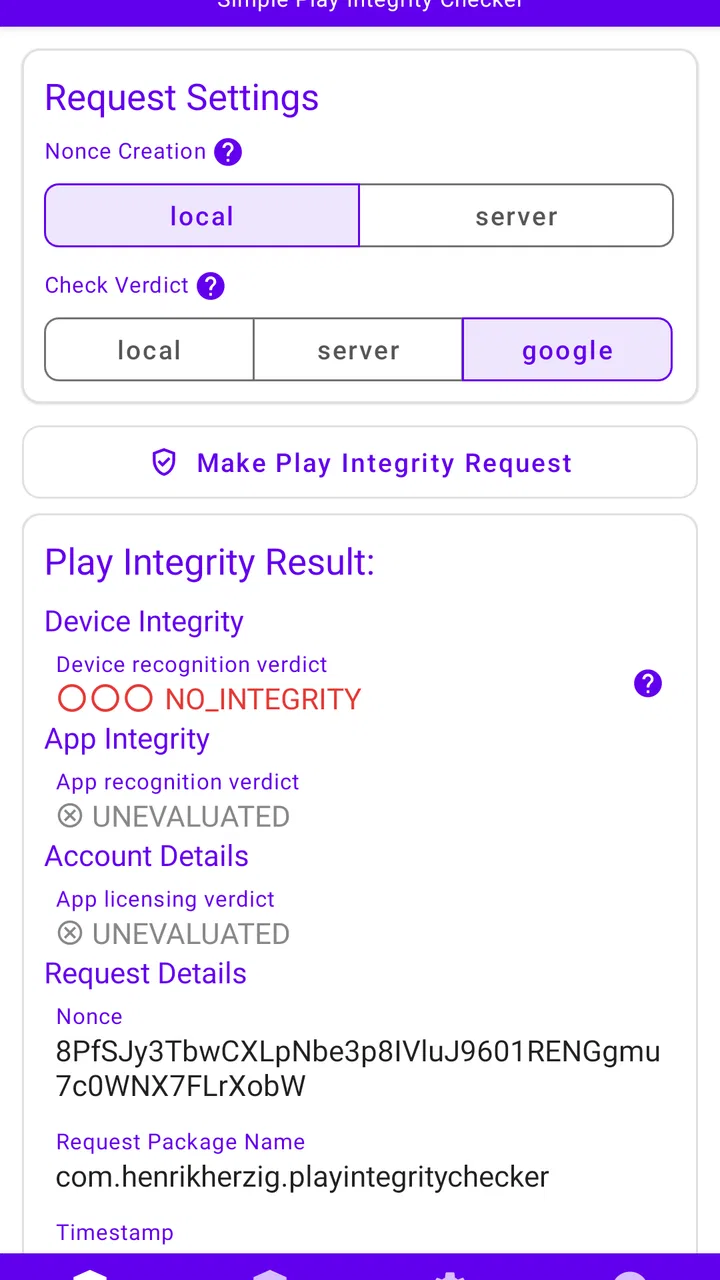
SPIC - Play Integrity Checker is the kind of Android app I would open with a very specific question in mind: what can my device and current app environment demonstrate through Google’s integrity-checking systems? It is not a general-purpose security suite, a phone cleaner, or a tool that magically repairs certification problems. Instead, it is a focused demonstration of the Play Integrity and SafetyNet Attestation APIs, presented in a form that makes those technologies easier to inspect from a mobile device.
That narrow purpose is also the reason I found it more interesting than its brief store wording suggests. The app sits in the Libraries & Demo section, and that classification matters. This is primarily a learning, testing, and verification utility rather than something most people will open every morning. I see it as a small diagnostic window into Android’s trust signals: useful when I am investigating a device, checking an unusual installation, or trying to understand why another app may treat the phone differently.
Henrik Herzig is listed as the developer, and the app is free with an Everyone age rating. It runs on Android 8.0 and later, while the current release is version 1.4.0. Those details make it accessible to a broad range of Android users, although accessibility should not be confused with universal usefulness. The right question is not whether everyone can install it, but whether the results mean something useful for the situation at hand.
You May Also Like

 Blood Strike: 2.5 Anniversary
Blood Strike’s Loadouts Turn Every Drop Into a Tactical Gamble
A close look at Blood Strike’s custom loadouts: how fast access to signature weapons reshapes its battle royale rhythm, rewards preparation, and narrows the gap between fights.

 Pandora - Music & Podcasts
Pandora’s Music Is Easy to Start, but Harder to Recover
Pandora’s strength is its low-effort path from a seed to a station. Its weak spot is how much confidence it asks you to place in connection, setup, and quiet recovery.

 8 Ball Pool
 Is Built on Rivalries, Rematches, and Routine
A close look at the rivalries, rematches, shared routines, and unanswered safety questions that turn a quick pool match into a persistent mobile community.

 Samsung Music
’s Quiet Strength Is Playing What You Already Own
Its reach comes less from spectacle than from dependable access to a personal library. That simplicity is both the app’s strongest retention engine and its ceiling.

 AccuWeather: Weather Radar
AccuWeather Review: A Quick, Clear Forecast for Everyday Decisions
For everyday plans, the best forecast is the one you can understand quickly. AccuWeather makes rain timing, radar, and local conditions easy to act on, with a few trade-offs.

 Hill Climb Racing
Why Hill Climb Racing Still Turns Crashes Into One More Run
A tiny car, a bumpy hill and one more upgrade: Hill Climb Racing keeps resurfacing because its simple chaos makes every near-miss feel personal.
More From Our News Desk



What the checker is really useful for
My first recommendation is to treat SPIC as an interpreter and demonstration tool, not as a final authority on every security question. Play Integrity and SafetyNet Attestation are designed to provide signals that applications can use when deciding how much they trust a device, an installation, or an interaction. Seeing a result in a checker can help me understand the kind of response an app might receive, but it does not turn the phone into a fully audited security environment.
That distinction prevents a common mistake. A reassuring result does not prove that every installed application is safe, that an account is protected, or that no system modification exists anywhere on the device. Likewise, an unexpected result does not automatically mean the hardware is damaged or that the user has done something wrong. It may reflect the installation route, the state of Google services, the device environment, or the way the relevant API evaluates the request at that moment.
The app’s strongest audience is therefore technical learners, Android enthusiasts, developers testing an application’s integrity-related behavior, and support staff trying to gather a clearer starting point before troubleshooting. I can also imagine it helping someone who bought a second-hand phone and wants an additional clue about the software environment before relying on banking, streaming, or enterprise applications. It is not a replacement for those applications’ own checks, but it can make a confusing conversation more concrete.
The short name, SPIC, is easy to overlook, yet the full name explains the purpose better: Play Integrity Checker. I would keep that distinction in mind when searching for it or discussing it with someone else. The app is not presenting itself as a broad “security checker” for every Android component. Its value comes from staying close to the two attestation technologies it demonstrates.
Why the network matters during a check
Connectivity shapes the experience more than it might appear from a simple diagnostic screen. An integrity request is not like opening a calculator, where the answer is produced entirely from a local formula. The result depends on services and validation steps beyond the visible interface, so I would perform a check with a stable connection rather than treating a failed attempt as immediate evidence of a compromised phone.
This is especially important when testing in a weak-signal location. On a train, in a basement, or while moving between Wi-Fi and mobile data, a request can become difficult to interpret. A loading delay, an error, or an incomplete response may describe the communication path as much as the device itself. I would first repeat the test after returning to a dependable connection, then compare the outcome instead of drawing a dramatic conclusion from one attempt.
That network sensitivity also changes how I would use the app during support work. If a friend sends me a screenshot from a crowded public network, I would ask them to retry at home before recommending a factory reset, firmware change, or other disruptive action. The checker is most helpful when its result is collected under ordinary, stable conditions and documented alongside what the user was doing at the time.
There is a practical lesson here: a checker cannot separate every possible cause for me. It can expose a useful signal, but I still need to consider connectivity, service availability, account state, system updates, and installation history. A failed check is a troubleshooting clue, not a verdict. That mindset is the difference between using SPIC thoughtfully and turning it into a source of unnecessary alarm.
Using it in everyday mobile situations
On a phone, the app is most convenient when I use it at the exact moment a question appears. Imagine installing an application that refuses to start and displays a vague message about device security. Instead of immediately uninstalling unrelated tools, I can open SPIC, run its relevant demonstration, and save the result for comparison. If the response looks normal, the problem may be specific to that application or its own requirements. If it looks unusual, I have a more focused direction for further investigation.
A second realistic scenario involves a refurbished or second-hand Android device. Before moving all my accounts to it, I could use the checker as one part of a broader inspection. I would still verify system updates, remove unknown accounts, review installed applications, and reset the device through the proper settings when appropriate. SPIC adds a technical observation to that process, but it should not be mistaken for a complete ownership-transfer checklist.
Developers can use the app differently. When testing a release that relies on integrity signals, I would compare behavior across a normal retail phone and a test device with a different software configuration. The useful workflow is not simply “run SPIC and accept the answer.” It is to record the environment, trigger the application’s own behavior, and see whether the two observations line up. That can reveal where the application’s assumptions are too broad or where its error message gives users too little guidance.
Students and curious users may benefit from a smaller experiment. Run the checker before changing anything, note what it reports, then make one controlled change at a time and test again. The point is not to chase a perfect-looking result. It is to learn that attestation is contextual and that a device’s software state can influence how an application evaluates it. This is a more valuable lesson than simply memorizing the names of the APIs.
Mobile use does introduce friction. A phone screen is a poor place for comparing many test runs, and copying technical results into a support conversation can be awkward. I would take a screenshot or write down the relevant wording immediately, especially if I am troubleshooting away from a desk. The app can help me collect evidence, but it does not replace a structured record of what changed between attempts.
Reading unexpected results without making things worse
The most important recovery habit is to change one variable at a time. If a check fails, I would not simultaneously clear several services, uninstall tools, alter system settings, and reboot repeatedly. That may remove the very evidence I needed. First, I would confirm the network, repeat the check, and note whether the same response appears. Then I would review recent changes, such as a system update, a newly installed package, or a change in the device’s software configuration.
This approach is particularly valuable for less technical users. Integrity-related wording can sound severe, but the correct next step depends on the surrounding context. A temporary service problem, a stale state, or an unsupported environment can produce a different kind of issue from deliberate system modification. SPIC can help distinguish “the check returned something unexpected” from “I have no information at all,” but it cannot make that diagnosis on its own.
If the result changes between a weak connection and a stable one, I would prioritize connectivity and service conditions before touching the phone’s software. If it remains consistent, I would compare it with the behavior of the application that prompted the investigation. Does that application fail only at login, or does it refuse to open? Does the problem affect one service or several? Those questions are more useful than repeatedly pressing the check button without a plan.
Another sensible recovery step is to preserve the original state. Before making a major change, I would capture the screen and record the device model, Android release, and recent actions in ordinary notes. The checker does not become more accurate because I run it many times in a row. Repetition is useful for spotting consistency, but it is not a substitute for controlled troubleshooting.
There is also a limit to what I would ask this app to do. I would not use it as a reason to bypass an application’s security requirements, and I would not assume that a favorable result authorizes access to a service that has rejected the device. When a banking, work, or streaming application reports a problem, its support team may need information from its own checks. SPIC can provide context, but it cannot override another application’s decision.
Keeping the testing process sensible on mobile data
Because the experience involves network-dependent checks, I would avoid treating every retry as free from a data and battery perspective. The app is free to install, but that does not mean the surrounding network activity has no cost. On a limited mobile plan, I would run a deliberate test rather than repeatedly refreshing while travelling. A stable Wi-Fi connection is the practical choice when I am investigating a problem that is not urgent.
This does not require turning the process into a complicated laboratory exercise. Before opening the checker, I would decide what question I am trying to answer: whether the result is repeatable, whether a recent change affected it, or whether a particular application’s complaint has any broader context. One or two well-timed checks are more informative than a long sequence of identical attempts.
Connectivity can also affect privacy expectations. I would use the app in a setting where I am comfortable making a diagnostic request, especially if the phone belongs to an employer or contains sensitive work information. The checker’s purpose is technical, but the surrounding device and network still deserve normal care. I would avoid sharing screenshots publicly if they expose account details, device identifiers, or other personal information.
For developers, a data-conscious workflow means separating network testing from application testing. If I am evaluating how an app responds to an integrity result, I would keep notes about whether the test used Wi-Fi or cellular service and whether the connection changed during the run. Otherwise, I might incorrectly blame application code for a result that was influenced by the test conditions.
This is one area where the app’s focused design works both for and against it. It does not invite me into a large dashboard full of unrelated monitoring panels, which keeps the task clear. At the same time, it gives me no reason to expect a complete history or a sophisticated offline report. I would therefore save the observations I care about instead of assuming the phone will preserve a detailed troubleshooting record for me.
Where it beats ordinary alternatives, and where it does not
The usual alternatives are indirect: reading an application’s error message, searching forums, checking whether Google services appear updated, or installing a broad device-information utility. Those approaches can be useful, but they answer different questions. A generic hardware app may show model and system details without demonstrating the integrity APIs. A forum post may describe a similar symptom without matching my device. An application’s own warning may be too vague to explain what it evaluated.
SPIC’s advantage is focus. It gives me a dedicated place to examine the technologies named in its purpose instead of making me infer everything from a third-party application’s behavior. That makes it a better first diagnostic step when the issue specifically involves Play Integrity or SafetyNet Attestation. It is also less intimidating than setting up a full development environment merely to understand a basic response.
However, a generic device-information tool is better when my question concerns storage, sensors, processor details, battery state, or Android build information. A developer’s own test suite is better when I need repeatable automated checks integrated into a release workflow. Official support is better when an account or service has blocked access and only that provider can explain its policy. SPIC is not a universal replacement; it is the sharper instrument for a narrower question.
I also would not recommend it to someone who simply wants a “one tap” security score. The app’s subject is technical, and the meaning of a result requires some interpretation. If I am looking for malware scanning, permission management, password protection, or theft recovery, I should choose tools designed for those jobs. Installing this checker will not turn those needs into something it can address.
Its public reception suggests that the focused idea has found an audience: it holds a 4.2 average from around four hundred ratings, with over one hundred thousand installs. Those figures indicate real interest, but they do not remove the need to understand the app’s boundaries. A popular diagnostic utility can still be the wrong choice for a user who expects repair functions or a complete security audit.
Who should install it and who should skip it
I would recommend SPIC to an Android developer who needs a convenient reference point while testing integrity-sensitive behavior. I would also suggest it to advanced users who are diagnosing a device that behaves differently from expected, and to learners who want to see how Android trust checks fit into real-world application behavior. In each case, the app is most valuable when paired with a specific question and careful notes.
I would be more cautious about recommending it to a casual user who has never encountered an integrity-related message. Without that context, the results may create more confusion than clarity. If the phone works normally and there is no troubleshooting task, installing a specialized checker may not add much to the everyday experience.
I would also ask business users to consider their support process before relying on it. A screenshot from SPIC can be useful background, but it should not become the sole basis for deciding whether a managed phone is compliant. Enterprise policies, application requirements, and organizational support procedures may carry more weight than a single local observation.
The Everyone rating and free price remove two common barriers, and the Android 8.0 minimum keeps the app within reach of older compatible phones. Still, the real barrier is understanding. This is an app for inspection, not entertainment, and its usefulness grows with the user’s ability to connect a result to a concrete technical situation.
My connectivity verdict after using it as a diagnostic tool
SPIC - Play Integrity Checker works best when I approach it as a calm, focused investigation aid. Its connection to Play Integrity and SafetyNet Attestation gives it a clear identity, while its placement among library and demonstration apps sets the right expectation: it helps me observe and learn rather than repair or protect every part of a phone.
The network-dependent nature of the checks is not a flaw by itself, but it demands good habits. I would test on a stable connection, avoid wasting mobile data on pointless repetitions, preserve the first unexpected result, and change only one condition at a time. Those steps make the output more useful and reduce the risk of blaming the device when the real problem is communication or service state.
My final view is positive, with a firm qualification. SPIC is worth installing when you need an integrity signal explained in a practical mobile workflow. It is not the right download for general security, automatic repair, or a simple health score. For developers, troubleshooters, and technically curious Android users, Henrik Herzig’s small utility can turn a vague complaint into a more informed starting point. For everyone else, I would wait until a real integrity-related question gives the app a clear job to do.
FAQs for SPIC - Play Integrity Checker
01What is SPIC - Play Integrity Checker used for?
SPIC - Play Integrity Checker is designed to ensure the integrity of apps and games on Android devices. It verifies whether the software has been tampered with or altered, providing a secure environment for users. This is particularly useful for developers and gamers who want to maintain the authenticity and security of their applications.
02How does SPIC - Play Integrity Checker work?
SPIC operates by analyzing the app or game files on your device and comparing them to the original source. It checks for any modifications or unauthorized changes. The app uses advanced algorithms to detect discrepancies, providing users with a detailed report on the integrity of their installed applications.
03Is SPIC - Play Integrity Checker safe to use?
Yes, SPIC is safe to use. It does not access personal data or interfere with other functionalities on your device. It solely focuses on evaluating the integrity of your apps and games. Users can trust SPIC to perform checks without risking privacy or security breaches.
04Does SPIC - Play Integrity Checker require internet access?
SPIC does not require constant internet access for its basic integrity checks. However, for updates and accessing cloud-based integrity databases, occasional internet connectivity might be necessary. This ensures that the app stays updated with the latest security protocols and integrity check methods.
05Can SPIC - Play Integrity Checker affect the performance of my device?
SPIC is designed to have minimal impact on device performance. It runs efficiently in the background and can be paused or stopped as needed. Users typically do not experience any slowdowns or performance issues while using the app, allowing them to maintain a smooth user experience.
Pros
- Easy to use interface for quick checks.
- Supports multiple Android versions.
- Provides detailed integrity reports.
- No registration required for use.
- Lightweight app with minimal storage use.
Cons
- Limited to Android devices only.
- No support for iOS systems.
- Lacks advanced user settings.
- Occasional false positives reported.
- Requires internet for full functionality.

SPIC - Play Integrity Checker
Gallery